학습날짜: 2025.07.28 ~ 2025.07.29
📑 Python Files
1. Google Colab에서 Google Drive 접근하기
from google.colab import drive
drive.mount('/content/drive')
2. 파일 모드

3. Writing into files
#File path 정의
filename = "test.txt"
filepath = "/content/drive/MyDrive/2025 LG U+ 8기/python"
filename = filepath + "/" + filename

#File Open
fd = open(filename, 'w')

#Write
fd.write("My First File \n")
fd.write("------------- \n")
fd.write("Python is easy!")

#close
fd.close()
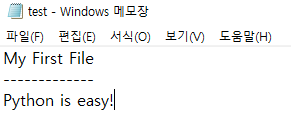
만든 test.txt 파일:
4. Reading from text files
- 모두 읽기
#open
fd = open(filename, 'r')

#read
content = fd.read()

#close
fd.close()

#print content
print(content)
- 한 줄씩 읽기
file = open(filename)

# 파일안의 콘텐츠를 한 라인씩 읽어오자
# Ver1. readlines(): 한 줄씩 읽어 리스트에 저장
for r in file.readlines():
  print(r)

# Ver2
while True:
  line = file.readline() # readline(): 파일의 한 줄씩 읽어 문자열로 반환
  if line == '': # EOF(End of File):
    break
  else:
    print(line)

file.close()

# Ver3.
for r in file:
  print(r)

file.close()
5. with statement
위 코드는 단점을 가지고 있음. file이 존재하지 않거나 read할 수 없을 경우 error!!발생하면 crash됨
가급적 with statement를 활용하자!
with statement는 context manager다. 들어갈 때와 나올 때 필요한 조치를 with 절에 주어진 context에 따라 적절한 action을 자동으로 실행함
File object에 대해서는 open 할 때, error가 발생하면, exception handling 해주고, 나갈때는 closing과 기타 cleaning action을 자동으로 수행해줌
#with ~ as 문법을 활용해서 file을 읽어보자.
filename = "test.txt"
filepath = "/content/drive/MyDrive/2025 LG U+ 8기/python"
filename = filepath + "/" + filename

with open(filename) as fd:
  for line in fd:
    print(line)
6. Working with binary files
- 사진데이터, zip file 등의 데이터는 binary data로 구성되어 있음
- 이를 다루기 위해서는 python의 bytes data type을 이용해야 함!
filename = "figure.png"
copyname = "cpfigure.png"
filepath = "/content/drive/MyDrive/2025 LG U+ 8기/python"
filename = filepath + "/" + filename
copyname = filepath + "/" + copyname

#copy & paste 기능을 구현해 보자 .
# Ver1.
with open(filename, 'rb') as f: # binary 파일이므로 'r' 이 아닌 'rb' 임!
  with open(copyname, 'wb') as c:
    c.write(f.read())

# Ver2.
with open(filename, 'rb') as f:
  with open(copyname, 'wb') as c:
    while True:
      data = f.readline(1024) # 최대 byte 값 2^10
      if len(data) == 0: # EOF(0byte)
        break
c.write(data)| 항목 | Ver1. | Ver2. |
| 방식 | 전체 한 번에 읽기 | 조각(1024byte)씩 나눠 읽기 |
| 코드 길이 | 짧고 간단 | 길고 복잡 |
| 메모리 사용 | 크기만큼 메모리 차지 | 적은 메모리 |
| 속도 (작은 파일) | 빠름 | 느릴 수 있음 |
| 속도 (큰 파일) | 느리거나 오류 가능 | 안정적 |
| 권장 대상 | 작은 파일 복사 | 큰 파일 복사 (동영상, 로그 등) |
'LG U+ Why Not SW Camp 8기 > 학습 로그' 카테고리의 다른 글
| 공부 일지 #13 | 미니 토이 프로젝트-Timer & Stopwatch (2) | 2025.07.31 |
|---|---|
| 공부 일지 #12 | tkinter로 계산기 만들기 (2) | 2025.07.30 |
| 공부 일지 #10 | Python Utility (3) | 2025.07.30 |
| 공부 일지 #9 | Python Class 기초 정리 (3) | 2025.07.25 |
| 공부 일지 #8 | Python Level Test (4) | 2025.07.23 |